Release 10.3.2.2
Printed From: Avidyne
Category: Avidyne General
Forum Name: IFD 5 Series & IFD 4 Series Touch Screen GPS/NAV/COM
Forum Description: Topics on Avidyne's IFD 5 Series and IFD 4 Series Touch Screen GPS/NAV/COM
URL: https://avidynelive.com/forum_posts.asp?TID=2768
Printed Date: 26 Mar 2026 at 12:59pm
Software Version: Web Wiz Forums 12.07 - https://www.webwizforums.com
Topic: Release 10.3.2.2
Posted By: AviSteve
Subject: Release 10.3.2.2
Date Posted: 05 Aug 2025 at 6:57am
|
Here are the release notes for 10.3.2.2 Bug Fixes
------------- Steve Lindsley Avidyne Engineering |
Replies:
Posted By: AviSteve
Date Posted: 05 Aug 2025 at 7:01am
|
10.3.2.2 is complete! We are doing a limited rollout to validate that it is working as expected. Once through that process, we will make it generally available. If you are specifically affected by a problem that would be resolved by the installation of 10.3.2.2 (e.g. GFC autopilot interface issues), then contact tech support for access. ------------- Steve Lindsley Avidyne Engineering |
Posted By: HenryM
Date Posted: 05 Aug 2025 at 10:32am
|
Nice. I'm interested in the Foreflight flight plan upload fix. |
Posted By: AviSteve
Date Posted: 05 Aug 2025 at 11:20am
|
Yes, that's the plan. ------------- Steve Lindsley Avidyne Engineering |
Posted By: gherb
Date Posted: 06 Aug 2025 at 4:44am
| There is an issue with the IFD540, when flying a flight plan on autopilot GPSS, when a new flight plan is active (reverse flight plan on return, for example), and the IFD100 still has the old flight plan, when you open the iPad, the IFD100 flight plan takes priority over the IFD540 and the plane immediately tries to initiate a course reversal. Has this been resolved? |
Posted By: paulr
Date Posted: 06 Aug 2025 at 7:05am
Came here to ask this. There are several other IFD100 bugs that I dearly hope get fixed as part of this release cycle, but this is the most obnoxious one.
|
 gherb wrote:
Posted By: Gary Lutchansky
Date Posted: 06 Aug 2025 at 8:51am
Good news. The upcoming IFD100 release does resolve this issue. P.S. I'm a member of the software engineering team at Avidyne.
|
Posted By: kempj
Date Posted: 06 Aug 2025 at 4:24pm
|
Gary, I installed 10.3.2.2 last week in my IFD440. Since the upgrade, I am unable to get flight plans to sync between the IFd100 app and the panel mount IFD440. The IFD100 apps connects and functions fine as far as frequency tuning, etc so its not a connection issue. If you create a flight plan in the app it doesn't appear in the panel mount and if you create in the panel mount it doesn't appear in the IFD100 app. The databases are also the same on both sides. I reported this today to Randall Edwards and he informed me he would report this to the software engineering team. Do you think the new upcoming IFD100 app will address this or is this an unknown issue. It did not exist with 10.3.1.2 Thanks, Kemp Johnson |
Posted By: Gary Lutchansky
Date Posted: 06 Aug 2025 at 5:01pm
|
Kemp, Yes, the upcoming release of IFD100 will work with your updated IFD hardware. The method of exchanging data over WiFi for 10.3.2.2 is more secure. Because of this, the new and the former methods of communication are not compatible. Coming soon! Gary
|
Posted By: kempj
Date Posted: 07 Aug 2025 at 4:30am
|
Gary, Since I am unable to create/manage/monitor flight plans in the ifd100 app do you know how long it will be before I can download the new version of IFD100? Is there a way to beta test the IFD100 app before it is released in a general way? Thanks, Kemp Johnson
|
Posted By: oskrypuch
Date Posted: 09 Aug 2025 at 5:07pm
|
That is huge, if it is what I think it is. Previously you restricted enroute VNav to only display on IFD550 units. Personally I always thought that was a huge misstep. So, now with an IFD540 (or 440?), the enroute VNav indication will be shown on the ASPEN? If so, that limitation has been mitigated! * Orest
|
Posted By: oskrypuch
Date Posted: 09 Aug 2025 at 5:32pm
|
I still don't see a fix for the standard resolution terrain warning depiction. It is unusable currently in standard resolution, and I have had to turn it completely off, otherwise the map becomes unreadable during departure and approach. * Orest |
Posted By: Gring
Date Posted: 10 Aug 2025 at 9:52am
|
Steve, can you confirm which G5 software release Avidyne has TESTED the new software with? I want to ensure nothing breaks.
Can you describe in detail what the GFC autopilot fixes are? What are the errors and what does it fix. Mine currently works fine.
|
Posted By: jimmyz80
Date Posted: 10 Aug 2025 at 10:06am
|
100%, I went back to using the Honeywell EGPWS in my plane since the terrain features on my IFDs are more of a hazard than a help. Glad to see the dimming bus issue fixed though. ------------- 2006 Cirrus SR22 - IFD540 IFD440 DFC90 AXP322 MLB100 |
Posted By: AviSteve
Date Posted: 11 Aug 2025 at 12:27pm
VNAV wasn't specifically limited to the IFD550, but the lack of supporting PFDs may have made it seem that way. Yes, we worked with Aspen to have them display VNAV from the IFD. However, I'm not sure of their release schedule. ------------- Steve Lindsley Avidyne Engineering |
Posted By: Gring
Date Posted: 11 Aug 2025 at 3:22pm
|
The Garmin G5 also displays the VNAV carrot. The GFC500 autopilot will not control VNAV though. It allows arming, and annunciates VNAV in white, but does not engage.
I also had my G5s updated to 8.27 software today during the IFR cert, so we'll see how that works with the new release.
|
Posted By: AviSteve
Date Posted: 12 Aug 2025 at 3:40am
Our G5 is at 5.30
Some GFC autopilots wouldn't go into approach mode. We determined the cause was an error in the MapMx stream, which we fixed. ------------- Steve Lindsley Avidyne Engineering |
Posted By: Gring
Date Posted: 12 Aug 2025 at 5:04am
|
Steve, Thank you for the information, but come on, I can't believe that you guys are testing your software with Garmin software that is YEARS old. There are 19 releases between 5.20 and the current version. In fact, there isn't a 5.30 listed, just the jump from 5.20 to 5.50. There must be some mistake with that release number, can you verify with your team? I had not heard about that error with the GFC500, only on the GFC600 autopilots. I have heard about the GFC500 autopilots flying left of course by one dot. Can you confirm this was fixed too? I instruct in a number of Bonanza airplanes and have seen some of these issues with my clients. I have no idea why mine works just fine though.
|
Posted By: AviSteve
Date Posted: 12 Aug 2025 at 5:15am

It was not specific to GFC, but we did make some improvements to the roll steering command while on approach to address such steady state deviations. ------------- Steve Lindsley Avidyne Engineering |
Posted By: Gring
Date Posted: 12 Aug 2025 at 5:37am
|
Steve, Pictures don't lie... Garmin G5 software version 5.30 is for experimental G5 installations only. It isn't for certified installations. Would you guys be willing to go back and update your G5 to the current 8.27 certified version and retest it with the 10.3.2.2 software to ensure proper operations?
|
Posted By: AviSteve
Date Posted: 12 Aug 2025 at 9:14am
|
We don't plan on updating our G5 and retesting at this point. ------------- Steve Lindsley Avidyne Engineering |
Posted By: PA23
Date Posted: 13 Aug 2025 at 5:46am
|
Steve, Looking through the list of bug fixes etc, what does this one mean? "Fixed
GPS Select discrete unexpectedly going invalid"
|
Posted By: AviSteve
Date Posted: 13 Aug 2025 at 7:11am
The IFD has a "GPS Select" discrete output. The behavior of that output varies based on configuration in maintenance mode during installation. In some instances, the IFD was not asserting that discrete as expected when there was a pending approach (indicated by a cyan mode in the nav source selection on the upper right corner of the IFD). ------------- Steve Lindsley Avidyne Engineering |
Posted By: oskrypuch
Date Posted: 13 Aug 2025 at 7:30am
Sort of, but still -- although the 550 WILL display the VNav path itself, on its pages (with no separate supported PFD), the 540 will not. That is the point I was making. There is no logical reason that a VNav progess SI could not have been added to the IFD MAP page, it is a normal constituent on "big boy" navigational displays roughly equivalent to the IFD MAP page (not just PFDs). To say the 540 does not have a "PFD" page, really isn't germane. Perhaps it was some sort of workload/certification issue. * Orest
|
Posted By: Victor
Date Posted: 14 Aug 2025 at 7:56am
Steve, Re we did make some improvements to the roll steering command while on approach to address such steady state deviations, can you please confirm that this is not only a fix for G5 and GFC500 configurations, but also a fix for G3X and GFC500 configurations. Thanks.
|
Posted By: chflyer
Date Posted: 16 Aug 2025 at 3:24pm
I tend to agree with Gring. My G5 is running release 8.25 and it would be good to have some confirmation that the new release has been tested with a recent G5 software. ------------- Vince |
Posted By: JEDEI120
Date Posted: 17 Aug 2025 at 4:26am
|
I not seeing these listed new features in 10.3.2.2 for my IFD440: • Map touch to create user waypoint • Direct-to waypoint from map • Stored route sorting • Enhanced stored route display Also note this new release broke the IFD100 app. IFD100 no longer communicates flight plans. Neither from the IFD100 app to IFD or vice versa!
|
Posted By: dmtidler
Date Posted: 17 Aug 2025 at 4:53am
I'm also in that same situation...running certified G5 release 8.27 and associated firmware released for GFC500. My current setup works fine. I don't want to mess that up.
|
Posted By: AviSteve
Date Posted: 17 Aug 2025 at 3:14pm
We did no specific testing with the G3X. However, the changes we made for that were not specific to any particular configuration. So if you're experiencing the same issue, I expect this to resolve it. ------------- Steve Lindsley Avidyne Engineering |
Posted By: AviSteve
Date Posted: 17 Aug 2025 at 3:32pm
Hoping you got a copy of the updated Pilot's Guide for your IFD. If not, please email or PM me. I expect the 10.3.2.2 PG to be available for general download in the near future. But here's a short version of what you should do to exercise those specific features.
An updated IFD100 app will also be available soon. ------------- Steve Lindsley Avidyne Engineering |
Posted By: Helfand
Date Posted: 21 Aug 2025 at 5:59am
|
Can please you explain what "Fixed incorrect ETA at destination when visual approach is selected" means exactly? Presently, in my PA-46 with Meggitt engine display, when I have any flight plan in my IFD (or if I am just flying direct to destination), the Meggitt display will show ETE and, based on fuel burn in the Meggitt system, Fuel at Destination. As soon as I add a visual approach - even before I activate it - I lose the output from the IFD to my Meggitt display to allow it to show ETE and Fuel at Destination. These then show ---- for both. Does "Fixed incorrect ETA at destination when visual approach is selected" correct this problem? Thanks, Bill |
Posted By: AviSteve
Date Posted: 21 Aug 2025 at 9:46am
That bug fix was in http://forums.avidyne.com/forum_posts.asp?TID=2497&PID=28523&title=10-3-2-1-visual-approaches#28523" rel="nofollow - response to a post by Gring . His post only called out a missing destination visible on the IFD, but later in that thread skybum02 mentioned that he saw an impact on his JPI. The fix was in the flight plan, so everything downstream of that would benefit - including the various outputs from the IFD like 429 and RS232. I don't know how your Meggitt is connected, but I'd bet it's one of those two, and I feel confident in saying that it will correct the problem you're seeing.
------------- Steve Lindsley Avidyne Engineering |
Posted By: jwellman
Date Posted: 22 Aug 2025 at 4:23am
|
I installed 10.3.2.2 on our IFD-440 yesterday. I used the backup/restore functionality for the settings but that didn't seem to restore the system settings (not sure if that's expected). Highly recommend taking a video of the settings page prior to updating! Thankfully we had this so getting back to normal was pretty easy. There is a new IFD100 app available and it was working well with 10.3.2.2: https://apps.apple.com/us/app/ifd100/id6745977257 We're seeing a RS232 error on our G5s but not sure if this is related or if I managed to mess something up on the settings. But everything works as expected so not sure what's going on with that. Test flight was done with with the VNAV setting disabled on accident...so hopefully can test that out this weekend with our GFC500. Thank you to the team for continued support and development! Jared PS, Steve pretty sure I talked to you at OSH, if that was you it was nice meeting you! ------------- 1954 E35 Bonanza IFD440 GFC500 |
Posted By: AviSteve
Date Posted: 22 Aug 2025 at 4:25am
Thanks for the status report Jared. Sadly, I wasn't at OSH this year so it must have been a different Steve. Wish I had been there to meet you! ------------- Steve Lindsley Avidyne Engineering |
Posted By: PA23
Date Posted: 22 Aug 2025 at 4:39am
Cell phone cameras work great to record the settings, do it now and retain them for the future in the off chance you ever need to send your unit back for repair and it comes back with all settings wiped.
|
Posted By: jimmyz80
Date Posted: 22 Aug 2025 at 3:11pm
|
PIREP on my update experience.... IFD540 update worked flawlessly, but most of my maintenance mode settings were lost, so I had to re-apply all of those for connectivity with my transponder, MLB100, stormscope, EGPWS, etc. I made sure to take a photo of each settings page beforehand. IFD440 on the other hand went through the whole upgrade process and then said "Your Avidyne system is NOT running an approved software version." I checked the Software Status page expecting to see a few rows in red
text, but instead everything was white, and the title at the top said
"Conforming". So it seems like the update process feels that it failed,
but the system status seems to think everything is OK. I just opened a support case with Avidyne, so hopefully I'll get things patched up soon. ------------- 2006 Cirrus SR22 - IFD540 IFD440 DFC90 AXP322 MLB100 |
Posted By: jwellman
Date Posted: 22 Aug 2025 at 3:14pm
Just curious, did you backup and restore these or did you have to manually set them? Jared ------------- 1954 E35 Bonanza IFD440 GFC500 |
Posted By: jimmyz80
Date Posted: 22 Aug 2025 at 3:46pm
|
The instructions say not to use the backup/restore functionality, so I just always take pictures and fix them as needed. I'd say it took me less then 2min to set them all from photos. ------------- 2006 Cirrus SR22 - IFD540 IFD440 DFC90 AXP322 MLB100 |
Posted By: MysticCobra
Date Posted: 28 Aug 2025 at 3:14pm
Steve, are we still in the "limited rollout" period? Will you make another post with information on how to download the software and installation instructions when the "general availability" period opens?
|
Posted By: jwellman
Date Posted: 28 Aug 2025 at 5:03pm
|
Will the IFD Trainer and IFD Trainer XP apps also be updated to work with the IFD100 10.3.2.2 version? Not a big deal to keep the 10.3 things around, just curious. Thank you, Jared ------------- 1954 E35 Bonanza IFD440 GFC500 |
Posted By: AviSteve
Date Posted: 28 Aug 2025 at 10:52pm
Yes it's still not out for general release, but rest assured I will post as soon as I know anything more. ------------- Steve Lindsley Avidyne Engineering |
Posted By: LarryPetro
Date Posted: 03 Sep 2025 at 12:11pm
|
Will VNAV be supported on the Avidyne Entegra/EXP5000 PFD? ------------- Larry Petro - Columbia 350 @ KFME |
Posted By: AviSteve
Date Posted: 04 Sep 2025 at 9:27am
There is no plan to modify the existing Entegra line to support enroute VNAV from the IFDs. ------------- Steve Lindsley Avidyne Engineering |
Posted By: chflyer
Date Posted: 22 Sep 2025 at 3:03am
|
Given that the trainer has now been updated to 10.3.2.2, it would be nice if the 10.3.2.2 PG revision could be added to the documentation available here https://www.avidyne.com/manual-guides/" rel="nofollow - https://www.avidyne.com/manual-guides/ in advance of general release of the software. ------------- Vince |
Posted By: Cardinal Flyer
Date Posted: 24 Sep 2025 at 11:48am
|
Ever since the trainer has been updated to 10.3.2.2, it no longer works on my Mini 5 running iPadOS 26. it starts to initialize and stops at "Establishing Communications", then closes. I have tried uninstalling and reinstalling, but no joy.
|
Posted By: chflyer
Date Posted: 24 Sep 2025 at 1:15pm
|
It starts fine on my iPad Pro (M4), running iPadOS 18.6.2. I can load a route and activate it, but it says there is no GPS fix and the map centres on somewhere around Connecticut not the route origin like it should. It seems that the trainer doesn't simulate the GPS location properly.< ="chrome-extension://ldinpeekobnhjjdofggfgjlcehhmanlj/inpage.js" id="leather-provider"> ------------- Vince |
Posted By: Gary Lutchansky
Date Posted: 24 Sep 2025 at 3:10pm
|
Cardinal Flyer, your reply to the original post has been moved to here: https://avidynelive.com/trainer-stuck-on-establishing-communications_topic2786.html" rel="nofollow - https://avidynelive.com/trainer-stuck-on-establishing-communications_topic2786.html Also, Chris from Support and I are both aware of your issue. We'll tag team in order to get to the solution.
|
Posted By: Gary Lutchansky
Date Posted: 24 Sep 2025 at 3:13pm
|
chflyer, your reply to the original post has been moved to here: https://www.avidynelive.com/topic2787_post30132.html#30132" rel="nofollow - https://www.avidynelive.com/topic2787_post30132.html#30132 By doing this, we can best focus on your issue, separate from comments on 10.3.2.2.
|
Posted By: Gring
Date Posted: 12 Oct 2025 at 11:31am
|
I now have had 10.3.2.2 installed on my two IFD540s and have successfully flown and tested the software in my normal avionics checkout sheet. I can confirm that in my installation, with dual G5s running certified software 8.27 and the GFC500 autopilot, everything works as expected and today in gusty crosswinds the autopilot flew rock solid exactly on course during an LPV approach with a 21 degree heading correction for the winds from the expected storm up the east coast. I know in previous versions, some reported (and I've seen in client's planes) a deviation from the course (1/2 dot left) on an approach. Mine never did that, so I don't necessarily see a change here.
A big thanks to Steve for answering a few questions along the way, his support has been outstanding. |
Posted By: Edmund Cammack
Date Posted: 15 Oct 2025 at 3:13pm
|
Set up. Garmin G600 PFD/MFD running latest firmware/software. Garmin GTX 345 Transponder, latest firmware/software. Ipad running IOS 26 and new install/download of the IFD 100 app 10.3.2.2. IFD 540 with 10.3.2.2 with radar unlock. RDR 2000 radar, worked well with Avidyne 10.3.1.2 software My shop installed 10.3.2.2 to my IFD 540. After, there was a config error message and we are getting a weird (ghost leg) at the beginning of the flight plan on the G600. The IFD 100 app sees frequencies but nothing else and won't load or transfer flight plans. the connectivity tab in the 100 app has nothing in it, no settings. there is no SVS or Radar tab under the MAP tab, only a chart tab, which is empty even though the IFD 540 has charts. there is also a TAWS tab under the Map tab but it is blank, no data/info.We uninstalled 10.3.2.2 from the IFD 540 and did a new, clean install. same with the IFD 100 app. same issues. I also intermittently lose 1090 ES on my transponder. A transponder reboot solves this for a short time. We then wiped both the ipad and IFD 540 and reinstalled 10.3.1.2 on the iFD 540 and redownloaded the 10.3.1.2 version of the app. the two connect but there is no SVS or Radar tab under the MAP menu. I also get a blue error in the aux page of the app that says connection established, reopen the app to complete. I kill and reopen and get the same error message in an infinite loop. Any thoughts?
|
Posted By: AviSteve
Date Posted: 15 Oct 2025 at 3:31pm
|
My first thought is that you should just change one thing at a time :) I'll send a PM and see if we can figure this out. ------------- Steve Lindsley Avidyne Engineering |
Posted By: jimmyz80
Date Posted: 15 Oct 2025 at 3:50pm
|
Adding another PIREP on my 10.3.2.2 experience. The entire reason I installed this update was to fix the issue with the Dimming Bus not being obeyed after any database updates. This was listed as fixed in 10.3.2.2, but as I discovered last night, it is not. The same exact bug continues to exist and behaves in exactly the same way. Additionally, CAS messages now never clear automatically, cannot be manually cleared, and will prevent future CAS messages from being generated. For example I'll get one fuel tank switch message, and it will never extinguish the blue AUX lights on my IFDs, as well as prevent any future fuel tank switch messages from being displayed. Similarly if I get a FLTA warning during the flight, my AUX lights will remain red for the remainder of the flight. I'll be going back to 10.3.1.2 ASAP. ------------- 2006 Cirrus SR22 - IFD540 IFD440 DFC90 AXP322 MLB100 |
Posted By: Gary Lutchansky
Date Posted: 15 Oct 2025 at 4:54pm
|
Edmund, In preparation for walking through the process with AviSteve, the following info might be helpful.
(1) Regarding the 10.3.2.2 configuration, when the iPad running IFD100 is configured for the IFD's WiFi, IFD frequencies will display on the IFD100. Synced flight plans and charts require additional checks before a full handshake is possible. In order to fully handshake, both IFD100 and IFD require:
With the 10.3.2.2 versions of IFD100 and the IFD, the "FMS Version" check will succeed. To pass the "Navigation Database region and cycle" check, identical Navigation Databases must be loaded on the IFD100 and, separately, on the IFD. And, for charts to display on the IFD100, charts must be downloaded on the iPad. Because you weren't seeing flight plan data and you had the same FMS versions, you either received the "NavData Mismatch" or "FMS Option Miscompare" message. Let's start there. (2) For IFD100 issues with 10.3.1.2 (previous release), first removing all of Avidyne's apps from the iPad and then reinstalling the IFD100 app would provide a clean slate to rule out any data format differences between the installed apps. Gary |
Posted By: IanJay
Date Posted: 16 Oct 2025 at 9:59pm
Have you tried using a different iPad running the 10.3 IFD100 app? I also downgraded from 10.3.2.2 back to 10.3.1.2 since the capstone protocol wouldn’t work properly with my Stratus & Stratux and not display wx/traffic on my IFD. I also reinstalled 10.3.2.2 a second time for troubleshooting but my issues persisted. Another pilot experienced the same issue as me. I believe the IFD100 app worked the same as it did before I updated initially but I’ll check tomorrow morning when I’m up in the air.
|
Posted By: wookie
Date Posted: 21 Oct 2025 at 2:45pm
Is anyone else seeing this behavior? Seems like a good reason not to update. Too bad, I really want a couple of the new features. Bill Hale ------------- BH |
Posted By: AviSteve
Date Posted: 21 Oct 2025 at 3:17pm
The CAS message bug is real, but it only affects installations with more than one IFD. We plan on having a fix available by the end of the year. I created a https://www.avidynelive.com/forum_posts.asp?TID=2803&PID=30201&title=10-3-2-2-cas-bug#30201" rel="nofollow - new topic dedicated to this subject .
------------- Steve Lindsley Avidyne Engineering |
Posted By: Edmund Cammack
Date Posted: 21 Oct 2025 at 6:02pm
|
Hello everyone, Sorry for the delay in posting. i resolved my issue and promptly forgot about everyone else. Just kidding. Below is an email i sent to Steve after we traded some private messages. It is worth upgrading the IFD 540 and 100 app to 10.3.2.2 in my opinion. All is working except radar, which i have on the 540. I don't have a radar tab on the 100 app, nor does the app see radar. Steve says it's a known issue and a fix is coming. Feel free to message me if you want further info. I really like the new features in the new software. My issues after upgrading the 540 and app to 10.3.2.2 were: 1. no connection between the 540 and the app except radio frequencies 2. no radar tab on the app and the SVS tab on the app says TAWS, not SVS, 3. a config error message on the 540 saying it needed service 4. a constant error loop on the app saying reboot the app to complet installation. 5 A ghost leg displayed on my G600 MFD and the incorrect distance to the initial waypoint. there was also a ghost/empty page in the config menu of the 540. 6. No 1090 ES out on my Garmin GTX 345 transponder Below is my post after finally getting a successful install on both 540 and app. My ipad is running IOS 26, the latest. A big shout out to Steve for very prompt replies and taking the time to help me. My text to Steve is bold and his reply is underlined. Thanks. Morning Steve, Several updates. After a
third clean install, which involved totally wiping the IFD 540, it now seems to
be 100%. Or I think it is. The config error message is gone, the transponder no
longer gives a 1090ES error message and everything else seems to be working. I think we figured out the
ghost leg but want to ask if the IFD is supposed to do this. While on the
ground, after lots of playing around, we scrolled all the way in on map page
and saw that the IFD seems to take into account that the airplane is not pointing
in the direction of the way point and calculates a turn and course to get to
the waypoint. If this is normal, then the box outsmarted my avionics tech and
me. Pics attached. We also changed a couple of
settings between the Garmin G600 and the IFD 540, per instructions my tech
received from Avidyne support in an effort to get the IFD to properly
communicate with the G600 and transponder, pics attached. The IFD 100 app is now better
but not 100%. It connects and does flight plan transfer. The issues remaining
are on the Map page. I have three tabs. TAWS, MAP & CHARTS. The fourth tab,
RADAR is missing and the SVS tab is labeled as TAWS. In my test flight
yesterday the TAWS tab displayed what the IFD 540 showed on its SVS tab. The
mislabeling was confusing when the two didn’t connect. Why does the app call it
TAWS instead of SVS? On the app, charts are blank
with "a data not available error message." My charts on the IFD 540 expired
12/2024 and I no longer subscribe to charts. When I deleted the IFD 100 app I
lost charts in my jeppesen download so maybe the error is that the 540 &
100 don’t have the same database for charts??? Currently, the IFD 100 has no
charts but I thought that the 100 couldn’t hold or display charts, that the 540
pushed charts to the 100 app. How do I get the radar tab on
the 100 app and then get the app to see and control the radar? Both 540 and 100
are on 10.3.2.2 with clean installs. Thank you for your responses. Excellent, I’m glad you got it working. Yes, when you do a direct-to, the IFD computes the entry turn to get you on course. If you’re pointed somewhere close to the right direction anyway, you’ll often not even notice the curve. But if you’re way off, then you’ll see it. And if you’re really close to the target waypoint and not pointed at the waypoint, then you’ll see an almost 360 degree turn as you noticed in your picture. We were able to induce the same behavior with respect the map page tabs here in the office. The problem is the IFD100 and Gary is looking into it. Once he finds the problem, he’ll push an update to the IFD100 that you can then download. As you noticed, the SVS and TAWS tab actually display the same content – we just rename the tab “TAWS” if you have purchased the TAWS option for your IFD. So your TAWS tab is completely usable and once the IFD100 is fixed, it will go back to saying “SVS”. That same error is responsible for the RADAR tab not appearing on the IFD100. As for charts, the IFD100 keeps its own charts data.
They are not transferred from the IFD to the IFD100 – the IFD just doesn’t have
enough bandwidth for that. So if you had a charts subscription, you would
be able to update the IFD100 and the IFD. Without a subscription, you’ll
have charts on neither of them.
Steve |
Posted By: Gary Lutchansky
Date Posted: 18 Nov 2025 at 3:46pm
| Versions 2025.10 for IFD100 and IFD Trainer have been submitted to Apple for review. The fix to the SVS/TAWS tab label for the MAP page is included. Based on typical Apple review times, the versions are likely to be available for release on Friday or Saturday. |
Posted By: Edmund Cammack
Date Posted: 19 Nov 2025 at 7:39am
|
Good morning, Any update on the radar tab? Thank you.
|
Posted By: Gary Lutchansky
Date Posted: 19 Nov 2025 at 9:37am
| The Radar tab is on our "radar". It'll be looked at very soon. |
Posted By: Gary Lutchansky
Date Posted: 19 Nov 2025 at 9:37am
| Updates to IFD Trainer and IFD100 are now available: https://avidynelive.com/topic2821_post30283.html#30283" rel="nofollow - https://avidynelive.com/topic2821_post30283.html#30283 |
Posted By: Spongebob38
Date Posted: 20 Nov 2025 at 2:33pm
| Is 10.3.2.2 still on a limited rollout? The latest post was in August. |
Posted By: AviSteve
Date Posted: 23 Nov 2025 at 7:20pm
You can get it if you want it. If you have a single IFD installation, I would suggest getting it. If you have a dual installation, I would wait until the next release because of the CAS bug that has been mentioned on other threads. We are targeting end of 2025 for that release. ------------- Steve Lindsley Avidyne Engineering |
Posted By: Cardinal Flyer
Date Posted: 23 Nov 2025 at 8:51pm
|
Posted By: Spongebob38
Date Posted: 24 Nov 2025 at 6:26am
|
Steve, Yes. I have a single installation and would love to get it. Thanks, john
|
Posted By: AviSteve
Date Posted: 24 Nov 2025 at 10:17am
|
You can coordinate with tech support to get it. ------------- Steve Lindsley Avidyne Engineering |
Posted By: wb8wka
Date Posted: 25 Nov 2025 at 12:00pm
| My Aspen now is debugged so I'm looking at upgrading to 10.3.2.2 and love to pick your brain. |
Posted By: AviSteve
Date Posted: 03 Dec 2025 at 2:19pm
|
Updated pilot guides are now available on the Avidyne website. Look under Support, then "Manuals and Guides". Or just go here... https://www.avidyne.com/manual-guides/" rel="nofollow - https://www.avidyne.com/manual-guides/ ------------- Steve Lindsley Avidyne Engineering |
Posted By: wb8wka
Date Posted: 03 Dec 2025 at 2:28pm
In case you don't hear this enough, thank you so much for this level of support, both directl as well as your user forums and FB. Having just come off an install with Aspen, your level of transparency is refreshing, to say the least.
|
Posted By: cpzjr
Date Posted: 31 Dec 2025 at 2:44pm
| Well, updated my 550 to 10.3.2.2 now unit is stuck in the maintenance mode. Tech support does not return calls. would like to reload 10.3.1.2 or 10.3,0.2 to try to get operational does anyone have any idea how to find the file for those software? Thanks for the help., Phil (all reboots go directly to the maintenance page instead of the flight mode page.) |
Posted By: SB Jim
Date Posted: 12 Jan 2026 at 4:26pm
|
I have been running 10.3.1.2 and decided to upgrade. The IFD 540 has been installing 10.3.2.2 for 105 minutes now; about 20 minutes longer than the bulletin advises. Status is: Load 10.3.2.2 Not Sel. System Conformity Ch… Pending Create Gold Master C… Not Sel. Progress bar is at 24% with the aircraft symbol going right. This has not changed in more than 30 minutes. What should I do? It seems hung up.
|
Posted By: MysticCobra
Date Posted: 13 Jan 2026 at 7:03am
| Hopefully you've called tech support or submitted a support ticket by now. Let us know the resolution. |
Posted By: AviSteve
Date Posted: 13 Jan 2026 at 8:32am
|
I spoke with Jim soon after his post. His attention to detail was very helpful in resolving the situation. He reported that he saw the "Updating Flight Application" message appear. That's one of the last steps of the update. So I had him reboot the IFD and do the conformity check by hand. It passed. After the flight application is updated, there is a step that restores the stored route files. Apparently that step failed. Had that step succeeded, the very last step would have been for the update to do the conformity check. As expected, the stored routes didn't get properly restored and the failure mode was that there was no "Activate Route" button on the stored routes list page for any of the routes. New routes could be created and those would work just fine. The USB stick still had the backup file which was created at the start of the update and I advised him to restore it by hand. That was later in the evening, though, so I don't know the result of that. I'll let Jim post back on that subject. Jim sets a good example, though, because the more detail that can provided when something like this occurs, the the higher the likelihood of a successful outcome. Of course, we try our best to make sure things like this don't happen in the first place, but no matter how hard we try there will inevitably be situations that arise. I'm still not sure why the stored route restoration failed and hung the process, but we'll start looking into that first thing this morning. ------------- Steve Lindsley Avidyne Engineering |
Posted By: Gring
Date Posted: 13 Jan 2026 at 7:20pm
|
Thanks Steve. This is one of thing things that makes Avidyne support work so well. You've always been most helpful. It is greatly appreciated. |
Posted By: Melohn
Date Posted: 13 Jan 2026 at 7:28pm
Steve; I had the exact same problem on one unit when I upgraded two 440s a few months ago. Tech support told me to just reboot, and everything appeared fine. My stored routes on the hung unit had the same issue; they were there, but could not be activated. This wasn't a problem since the stored routes for me live on ForeFlight, so I just deleted them from the IFD that hung and added them back via WiFi from ForeFlight. They also worked perfectly fine on both units when loading them from the 440 that did upgrade correctly. I usually use this forum when the issue doesn't require immediate attention, and go to tech support when it does. If it is helpful to document such things here, please let us know. |
Posted By: SB Jim
Date Posted: 14 Jan 2026 at 11:02am
Now for the rest of the story, which has a happy ending. :-) I’m meticulous about these sorts of processes and very experienced with computers. Once it hung up I decided simply to give it time. Once it was well after 4pm Florida time I decided to call Avidyne Tech Support. Of course they were very busy so it went to voice mail. So I emailed Tech Support. Then I thought to post here hoping STEVE might see my post. Thankfully he did! The bulletin very specifically advises DO NOT SHUT DOWN the IFD but I needed to do something. Fortunately Steve sent me a PM which I saw. I called him and after a very brief conversation he figured it out and told me what to do. It involved rebooting and checking some things. All seemed well. The only oddity was my stored routes all came through but there was no option to Activate the chosen route. Several hours later Steve texted telling me what to try (adding a new waypoint to the end of each stored routes) and sure enough that fixed it (I tried that early yesterday morning). To their credit tech support emailed me yesterday morning as well and I updated them. Undoubtedly I have one of the earliest units (I was a pre-purchaser I think in 2011 and it was installed in early 2015). It was returned to Avidyne once for required updates and I updated it successfully to 10.3.1.2 and it has been FLAWLESS for the entire time I’ve owned it. I have the Bluetooth keyboard and rarely use it; I’ve tried the IFD 100 app but don’t use that because the IFD 540 resides prominently in the top center of my Bonanza panel adjacent to the 6 pack. I understand computers and am not unhappy about this incident whatsoever. Stuff happens. But Avidyne’s tech support couldn’t have been better. Steve is fantastic and we are lucky to have him and his extensive knowledge of the IFD. Just talking to Steve was enlightening. He honed in on the issue quickly. All I need to do now is a simple test flight which I expect will be fine. Sorry for the long post; I remain a very satisfied Avidyne customer with the IFD 540 and AXP 340 which work beautifully.
|
Posted By: cpzjr
Date Posted: 14 Jan 2026 at 5:01pm
| I second that. Steve’s responses are much appreciated. Think my 550 and 440 combo is best in the business. |
Posted By: berndmr
Date Posted: 25 Feb 2026 at 1:01pm
@ AviSteve: Any chance implementation is changed or extended for a workflow that also works on IFD440? Expectation: Im an on MAP and zoom/pan to a waypoint I am interested in -> touch waypoint and get cross-hair -> press -D-> and get the dialog to activate direct to. Reality: Im an on MAP and zoom/pan to a waypoint I am interested in -> press -D-> Dialog opens, MAP zooms out and resets center to Aircraft position -> on the not blocked 2x2inch Mini-MAP not be able to find my waypoint anymore. Greetings Bernd 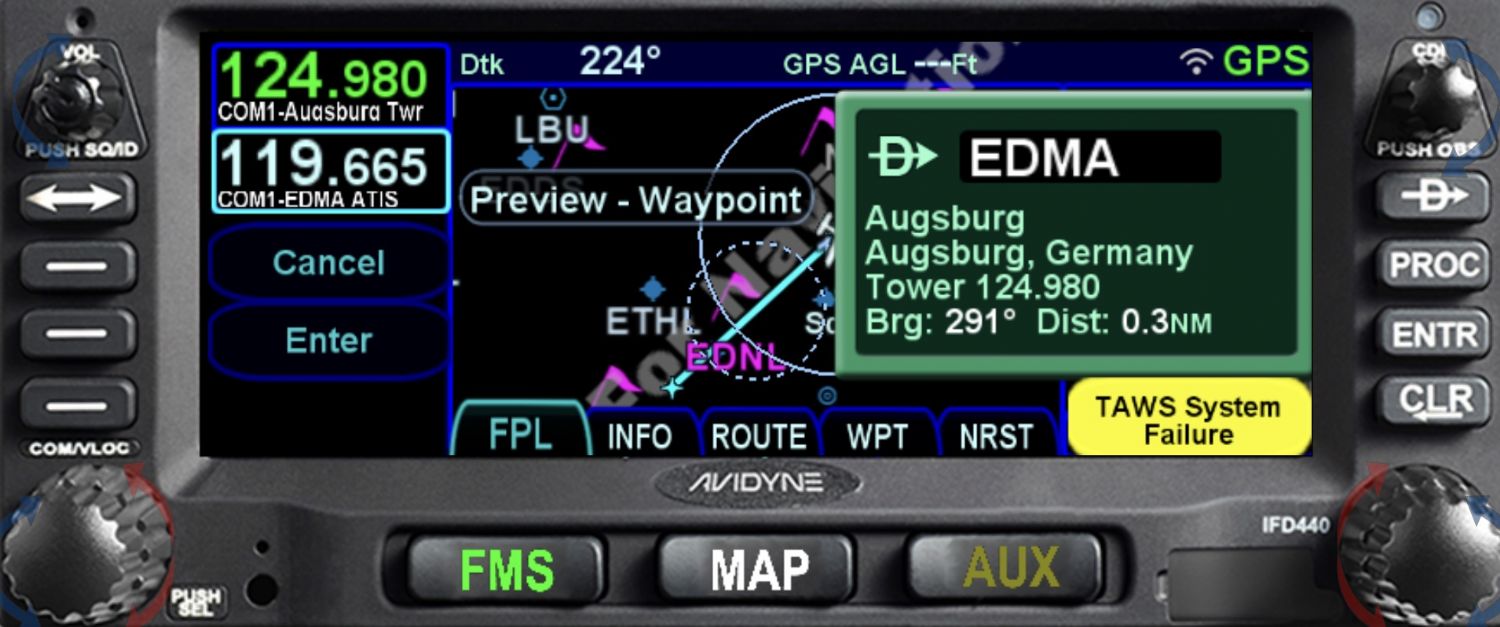 |
Posted By: cpzjr
Date Posted: 12 Mar 2026 at 11:36am
| Is there a new release so we can do the dual installation update. quoted above recommended waiting for next release slated for end of 2025 due to CAS problem, Thanks, Phil |
Posted By: AviSteve
Date Posted: 16 Mar 2026 at 10:03am
The theory of the user interface is to invoke an operation and then enter the data. In the scenario you're describing, you are sort-of attempting to select the data first, then invoke the operation. Unfortunately, when you select the operation (-D->) the preview kicks in and moves your map. I can understand why you are attempting to operate the system in that manner, but the IFD just doesn't support such operation at this time. There is no current plan to change the behavior, but we'll keep it in mind if we're ever changing related functions in that area. ------------- Steve Lindsley Avidyne Engineering |
Posted By: AviSteve
Date Posted: 16 Mar 2026 at 10:11am
The CAS problem has been fixed, but we've delayed that release so that we can include other coming soon functionality. Shouldn't be much longer, but I don't have a date for you. ------------- Steve Lindsley Avidyne Engineering |
Posted By: Dr_jim
Date Posted: 16 Mar 2026 at 4:55pm
|
Folks, I have contacted 3 different shops to have my IDF 550 upgraded to 10.3.1.2, two have which told me they will pull the unit and send to Avidyne for upgrade and Avidyne charges $2,600.00 for the service. They are unwilling to perform the service as they said 9 times out of the 10 the software upgrade "bricks" the unit and it has to be sent out for repair anyway and now they have to charge for their attempt to update and the funds Avidyne charges for the update repair. First, I thought not have to pay the repair fee was why you would take it to an Avidyne dealer, but according to them they are still charged. Second, Is the update software really that poorly written? Anyway, thought on doing the upgrade myself as it does not sound like going to a dealer buys you much or at least the dealers I have talked to in CA? Jim
|
Posted By: PA23
Date Posted: 17 Mar 2026 at 11:50am
|
I haven't installed 10.3.2.2 yet, there wasn't enough in there for me to jump to it and I figured I'd wait until the next release. I have however personally upgraded 4 units (2-440 & 2-540) to 10.3.1.2 without any issues so I don't know why shops are having such a hard time. The 440's were on the previous release and the 540's skipped several releases. Very important to follow the instructions to the letter and ABSOLUTELY DO NOT lose power during the upgrade, if you lose power you will most likely be shipping the units back to Avidyne. In my case I made two cables, one connects to 72pin connector (main) and the other to the 25pin (radio) connector for power and connect both to a 12volt battery (using an old Concorde RG-35AXC) that is also sitting on a battery tender. The battery has more than sufficient power to run for the 40 min required to upgrade but figured keeping it topped off can't hurt as a just in case. Depending upon the version going from the time it takes to complete can be 20 to 45 minutes. Of course I did all of this under the watchful eye of my A&P who knows engines and airframes but not sure I'd trust him with a USB thumbdrive near the avionics.... Personally I think the Avionics shops you called are giving you a load of BS because they don't want to work on the units. I think Avidyne needs to improve their relationships with Avionics shops. |
Posted By: MysticCobra
Date Posted: 18 Mar 2026 at 10:55am
|
I was an early adopter of the IFD540 and did multiple software upgrades on that unit myself. One of the upgrades failed and required shipment back to the factory. I was told it had something do with an internal card that was part of the earliest units. The factory made the necessary hardware mod to my unit, installed the new software, and sent it back to me. It was still under warranty at the time. I have since upgraded to a 550 and performed a software update on it too with no problems. I don't know what experience your shops have had, but it has not matched mine.
|
Posted By: Dr_jim
Date Posted: 18 Mar 2026 at 11:54am
|
Thanks for the insight, I agree at least in central CA the shops are not happy when you mention Avidyne. I have done two upgrades to the unit before and things went well. I will probably give it a go as I am unable to get jep charts on ipad without paying for an additional subscription without the upgrade being done. Thanks again, Jim
|
Posted By: chflyer
Date Posted: 22 Mar 2026 at 5:27am
|
I agree with PA23 and think you are asking shops that simply don't want to support Avidyne, for whatever reason, so they come up with all sorts of arguments to drive you away. My shop is really a Garmin shop. I suspect that I am their only customer with Avidyne. But they are professional and very competent and they never complain to me about working on Avidyne. They have done all my software updates without any issue whatsoever, on both IFD540 and IFD440, over the past 10+ years. I think you need to find a shop that has no issues working on Avidyne equipment and is above all competent. Once you do, stay with them.
------------- Vince |